
ChatGPT Resume parser
- Get token from your profile page.
1) cURL request:
                                        # cURL request
                                        curl -X POST "https://www.docsaar.com/api/chatgpt_resume_parsing" \
                                            -H "Authorization: YOUR_TOKEN" \
                                            -F "chatgpt_resume=@YOUR_FILE_PATH"
2) Postman collection request:
- Please download the Postman collection JSON file from the link below:
https://drive.google.com/file/d/1WFiE-u7JLhUqx8MqzuuzqyveQDtXBcEp/view?usp=sharing
Import postman request json file step-by-step guide:
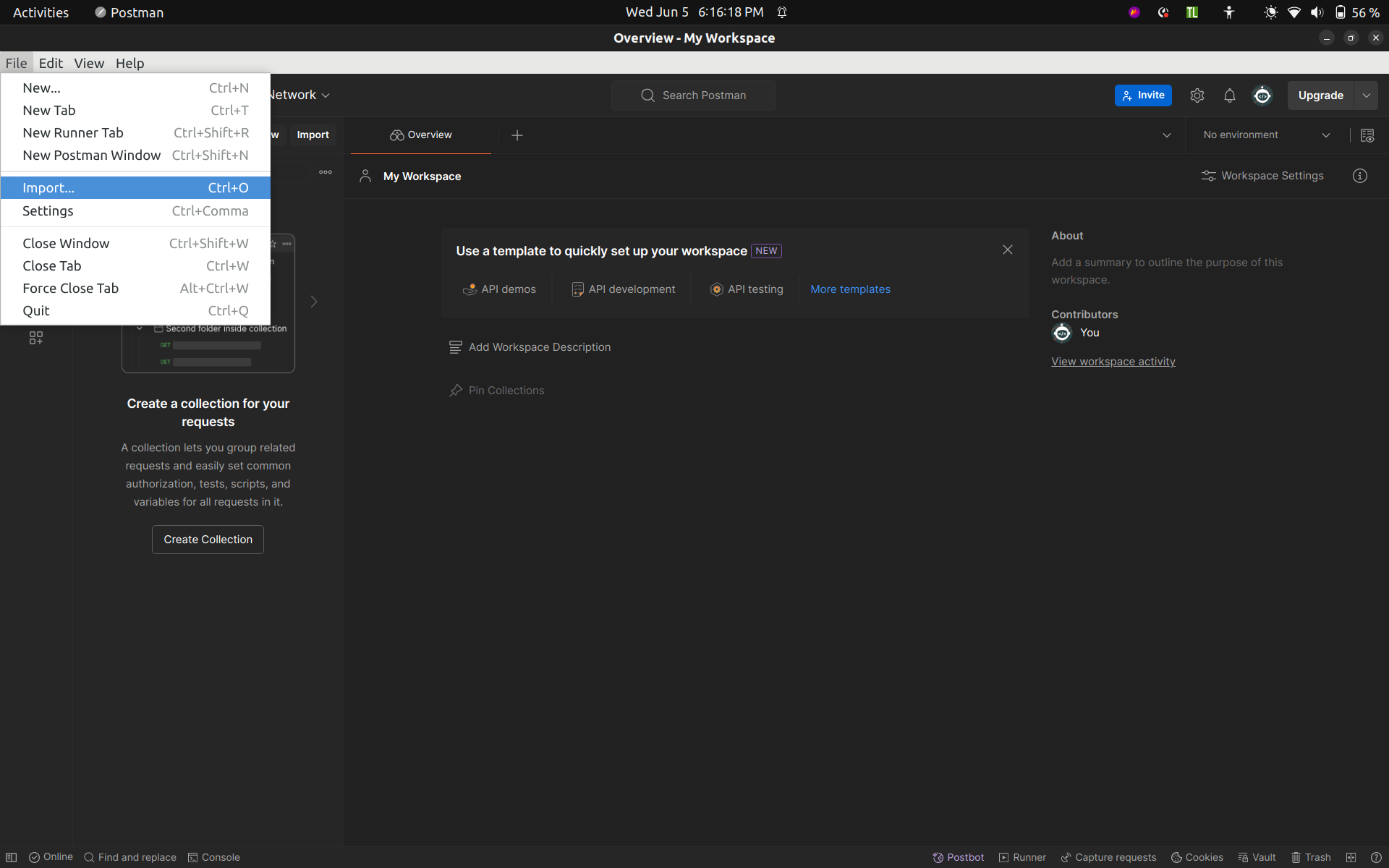
Step 1: Open the Postman application, click on the "File" option (top left), and select the "Import" option.
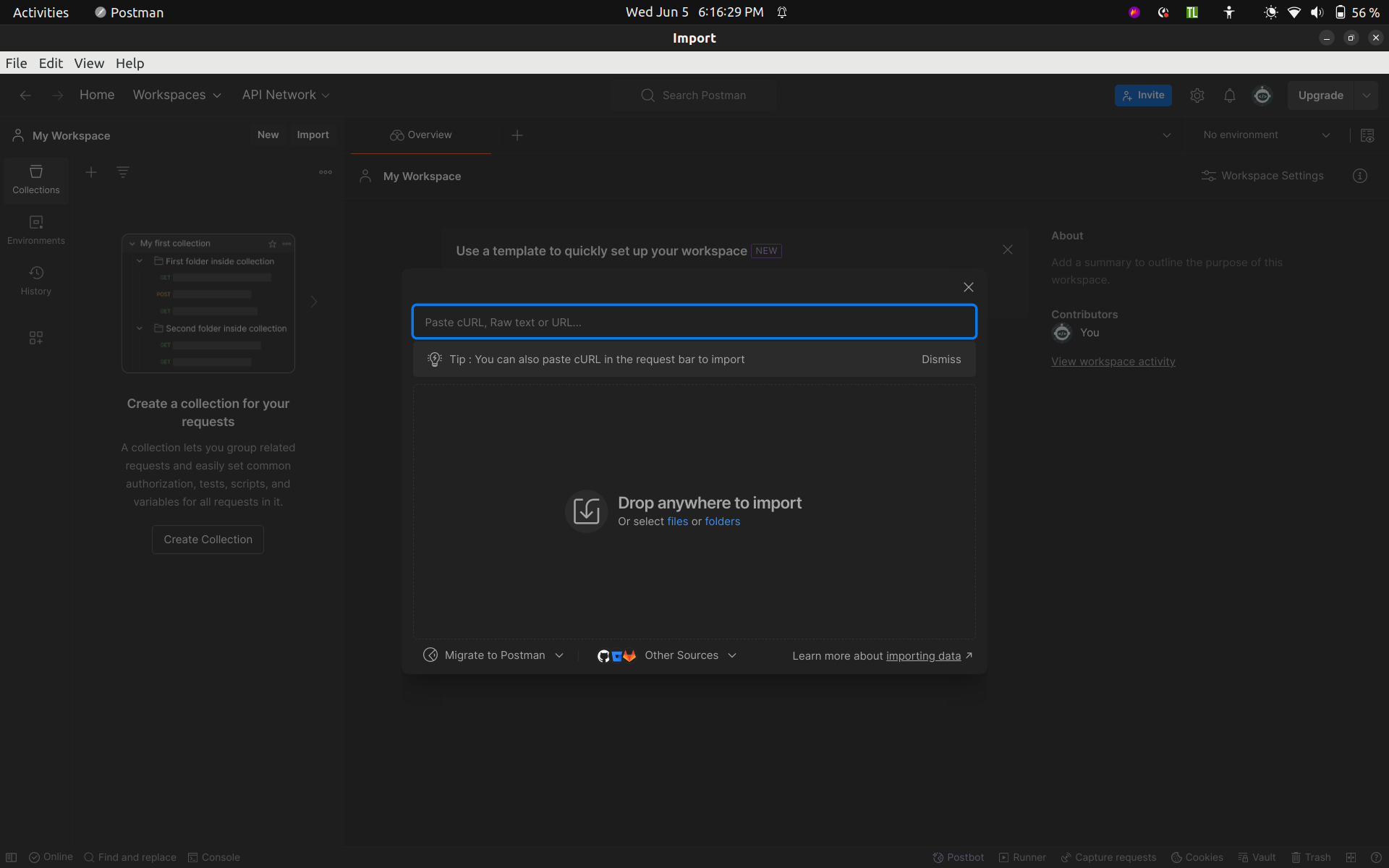
Step 2: A file upload dialog will open to import the JSON file. Select the Postman-request JSON file.
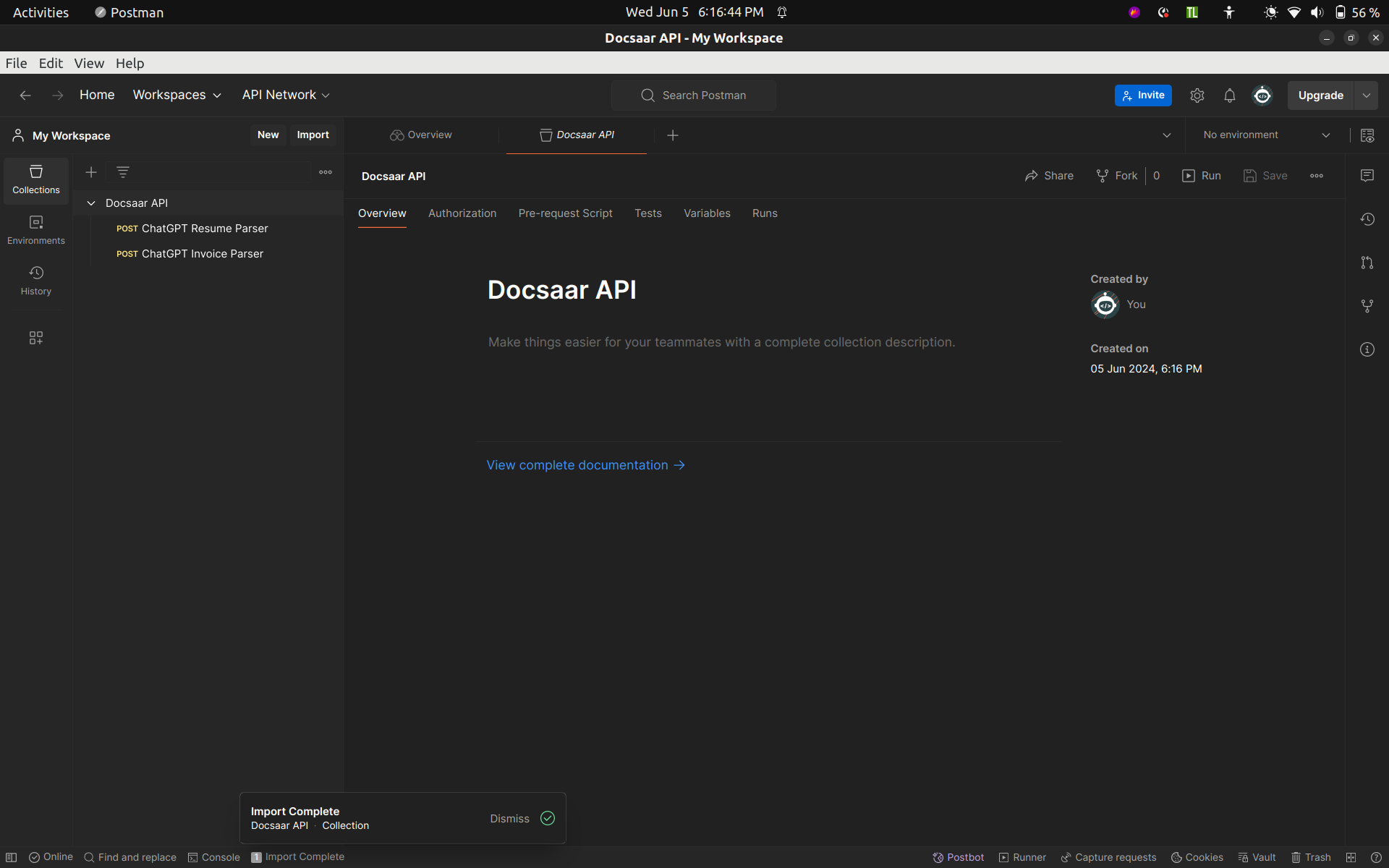
Step 3: Postman will display the collection of requests named “Docsaar API” from the JSON file under the "Collections" tab on the left sidebar.
Step 4: Click on the request you want to edit, and the request details will open in the main Postman window.
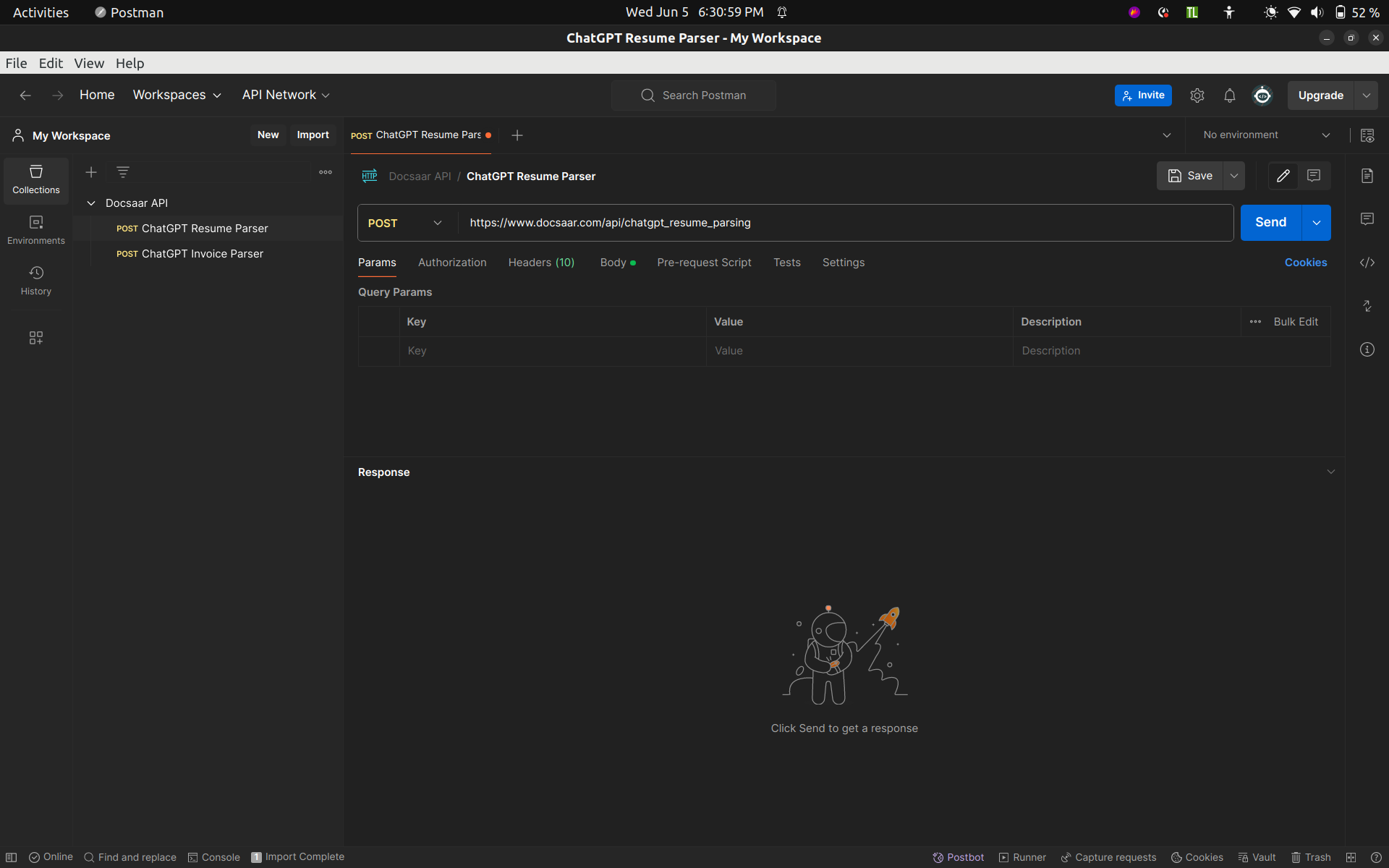
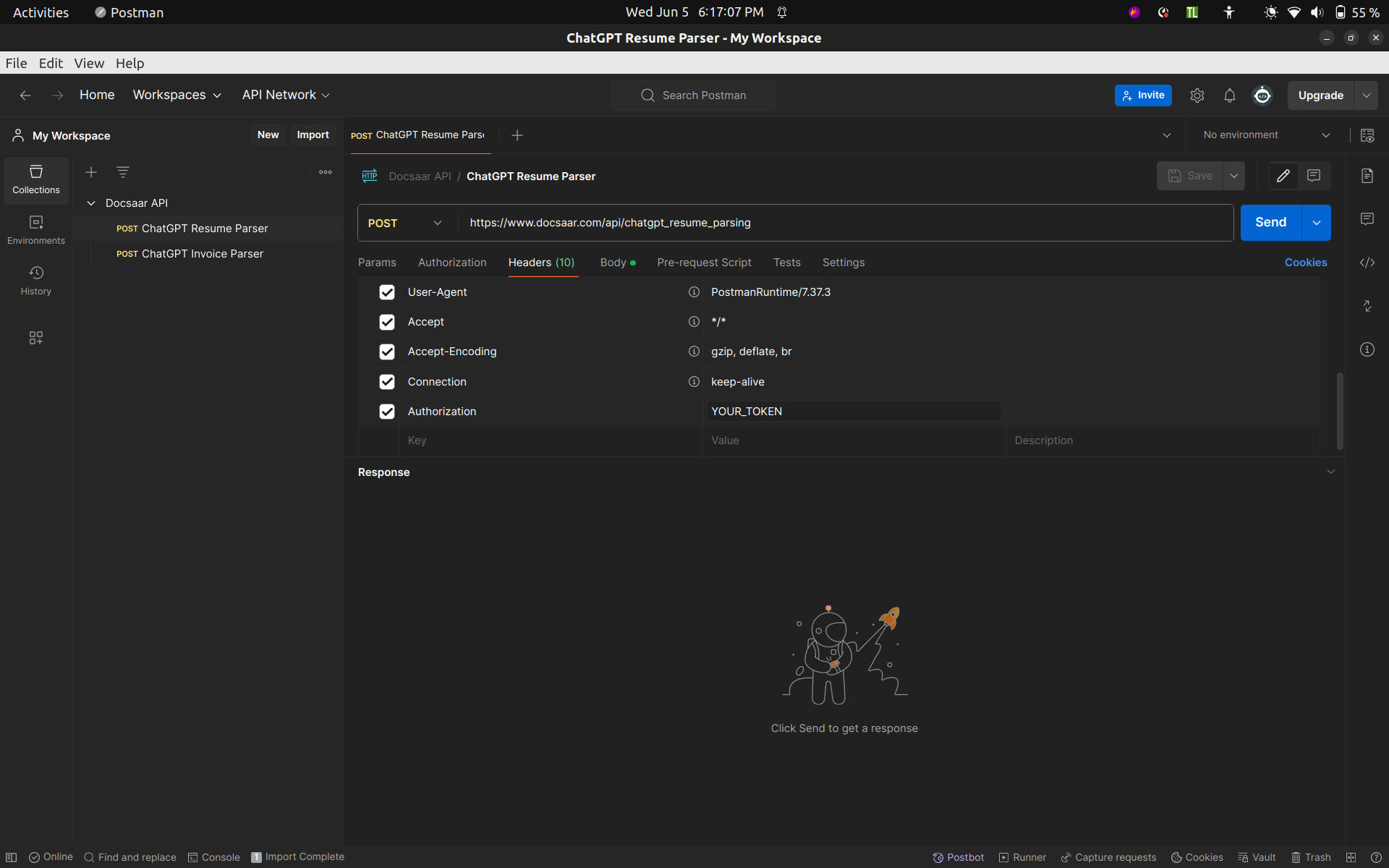
Step 5: Click on the "Headers" tab and add your API key in the "Authorization" field instead of "YOUR_TOKEN".
- Visit the Profile page - Docsaar website, and at the end of the page under the “API Credentials” section, you will find the API key for your Docsaar account.
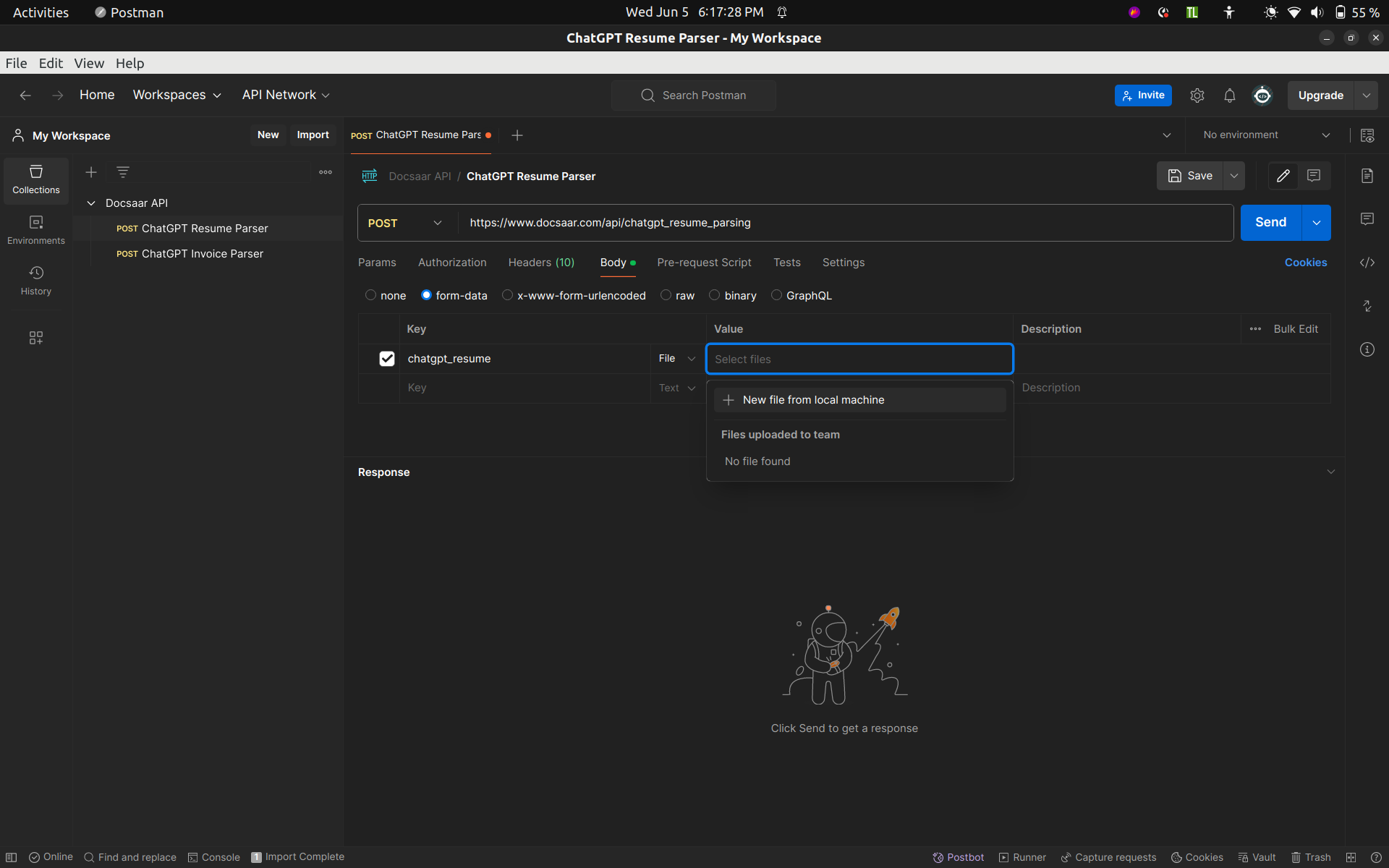
Step 6: Click on the "Body" tab and upload your PDF file from your local machine in the "chatgpt_resume" field or "chatgpt_invoice_image_file" field instead of "YOUR_FILE_PATH".
3) Python request:
- Create JSON like this:
To send input file and header to send your token
                                       # For sending file
                                        {
                                            'chatgpt_resume': open("INPUT_FILE_PATH", 'rb')
                                        }
                                        # Header to send token
                                        {
                                            'Authorization': 'YOUR_TOKEN'
                                        }
                                       #Make sure file path is correct
- Send this file and token to "https://www.docsaar.com/api/chatgpt_resume_parsing".
- Example python request
                                        import requests

                                        files = {'chatgpt_resume': open("YOUR_FILE_PATH", 'rb')}

                                        headers = {'Authorization': 'YOUR_TOKEN'}

                                        response = requests.request(
                                                method='POST',
                                                headers=headers,
                                                url= "https://www.docsaar.com/api/chatgpt_resume_parsing",
                                                files = files
                                            )

                                        print(response.text)
- You get output in JSON format like this:
                                        #For success:
                                        {
                                            "status" : "success",
                                            "output" : "GENERATED_OUTPUT"
                                        }
                                        #For failure:
                                        {
                                            "status" : "fail",
                                            "output" : "ERROR_DISCRIPTION"
                                        }
ChatGPT Invoice Parser
- Get token from your profile page.
1) cURL request:
                                        # cURL request
                                        curl -X POST "https://www.docsaar.com/api/chatgpt_invoice_parsing" \
                                            -H "Authorization: YOUR_TOKEN" \
                                            -F "chatgpt_invoice_image_file=@YOUR_FILE_PATH"
2) Postman collection request:
- Please download the Postman collection JSON file from the link below:
https://drive.google.com/file/d/1WFiE-u7JLhUqx8MqzuuzqyveQDtXBcEp/view?usp=sharing
Import postman request json file step-by-step guide:
Step 1: Open the Postman application, click on the "File" option (top left), and select the "Import" option.
Step 2: A file upload dialog will open to import the JSON file. Select the Postman-request JSON file.
Step 3: Postman will display the collection of requests named “Docsaar API” from the JSON file under the "Collections" tab on the left sidebar.
Step 4: Click on the request you want to edit, and the request details will open in the main Postman window.
Step 5: Click on the "Headers" tab and add your API key in the "Authorization" field instead of "YOUR_TOKEN".
- Visit the Profile page - Docsaar website, and at the end of the page under the “API Credentials” section, you will find the API key for your Docsaar account.
Step 6: Click on the "Body" tab and upload your PDF file from your local machine in the "chatgpt_resume" field or "chatgpt_invoice_image_file" field instead of "YOUR_FILE_PATH".
3) Python request:
- Create JSON like this:
To send input file and header to send your token
                                       # For sending file
                                        {
                                            'chatgpt_invoice_image_file': open("INPUT_FILE_PATH", 'rb')
                                        }
                                        # Header to send token
                                        {
                                            'Authorization': 'YOUR_TOKEN'
                                        }
                                       #Make sure file path is correct
- Send this file and token to "https://www.docsaar.com/api/chatgpt_invoice_parsing".
- Example python request
                                        import requests

                                        files = {'chatgpt_invoice_image_file': open("YOUR_FILE_PATH", 'rb')}

                                        headers = {'Authorization': 'YOUR_TOKEN'}

                                        response = requests.request(
                                                method='POST',
                                                headers=headers,
                                                url= "https://www.docsaar.com/api/chatgpt_invoice_parsing",
                                                files = files
                                            )

                                        print(response.text)
- You get output in JSON format like this:
                                        #For success:
                                        {
                                            "status" : "success",
                                            "output" : "GENERATED_OUTPUT"
                                        }
                                        #For failure:
                                        {
                                            "status" : "fail",
                                            "output" : "ERROR_DISCRIPTION"
                                        }